
Lightweight REST Client for Developers
Overview
Resting is a dedicated REST client designed to streamline the daily workflow of developers engaged in API testing and HTTP request analysis. Its primary purpose is to provide a focused, efficient environment for creating, executing, and managing HTTP requests with minimal overhead. The software addresses common pain points in API development, such as repetitive configuration, inconsistent environment setups, and the need for secure, local data handling. It is particularly suited for developers who require a reliable tool for testing REST APIs across different environments without relying on cloud-based services.
Target users include backend developers, frontend engineers working with APIs, QA testers, and DevOps professionals involved in integration testing. The software operates entirely offline, ensuring that sensitive API data remains private and secure on the user’s device. Real-world usage scenarios include validating API endpoints during development, debugging request-response cycles, and managing multiple environments through variable contexts. The tool’s design draws inspiration from Postman but emphasizes a lighter, more focused experience, avoiding unnecessary features that may slow down performance.
The developer, Resting Team, positions the application as a community-driven project, welcoming feedback and contributions. This open approach suggests a commitment to continuous improvement and user-centric design. While specific details about the team’s background are not provided, the project’s focus on privacy and local data storage reflects a strong emphasis on user trust and data sovereignty.
Key Features & Capabilities
- HTTP Request Creation and Execution – Users can create and send HTTP requests with full control over headers, methods, and parameters. This enables accurate testing of API endpoints under various conditions.
- Support for Multiple Request Body Formats – Resting handles multipart, x-www-form-urlencoded, and raw data payloads, making it suitable for testing APIs that expect different content types.
- Authentication Methods – Built-in support for BASIC, OAuth 2.0, and JWT authentication allows secure access to protected endpoints, essential for testing real-world API integrations.
- Variable Management with Contexts – Users can define reusable variables and organize them into contexts, enabling seamless switching between environments such as development, staging, and production.
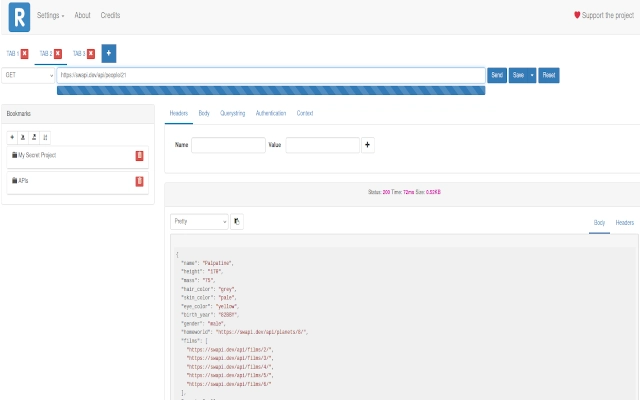
- Tab-Based Request Organization – Multiple requests can be managed simultaneously using tabs, improving workflow efficiency during active testing sessions.
- Response Highlighting and Copying – The tool provides syntax-highlighted responses and allows copying the entire response to the clipboard for quick analysis or documentation.
- Bookmarking System – Users can save frequently used requests as bookmarks and organize them into folders for easy retrieval.
- Import/Export via HAR Format – Bookmarks can be exported and imported using the HAR (HTTP Archive) standard, enabling data portability and collaboration across teams.
- Privacy-First Architecture – All user data, including API calls and bookmarks, is stored locally in the browser’s Indexed DB. No data is transmitted to external servers.
These features collectively support a smooth, secure, and repeatable testing workflow. For example, a developer can set up environment-specific variables, save a series of test requests, and quickly switch between contexts without reconfiguring each request. The HAR import/export functionality also allows integration with other tools or team workflows, enhancing collaboration without compromising data privacy.
User Interface, Workflow & Performance
Resting features a clean, tab-based interface designed for clarity and ease of navigation. The layout prioritizes the core functions: request creation, execution, and response viewing. Users can manage multiple requests within a single window using tabs, reducing the need to switch between applications or windows. The workflow is linear and intuitive—compose the request, configure headers and body, execute, and review the response—making it accessible even for users new to API testing tools.
Navigational elements are logically grouped, with clear sections for URL input, method selection, headers, and body configuration. The response panel displays structured output with syntax highlighting, improving readability and error detection. The tool’s lightweight nature suggests efficient resource usage, though exact performance metrics such as CPU or RAM consumption were not specified. Based on general software behavior patterns, the application is expected to operate smoothly on modern systems without significant performance degradation.
Stability appears to be a design priority, given the emphasis on offline operation and local data storage. The absence of cloud synchronization implies a focus on reliability and consistent behavior across sessions. Users can expect minimal latency during request execution, assuming stable network connectivity. The developer did not specify resource usage details, but the tool’s lightweight architecture suggests it is optimized for performance.
Compatibility & System Requirements
Resting is compatible with Windows, Mac, and Linux operating systems, offering broad accessibility across development environments. The software is available in version 1.0.0 and has an installation size of 120 MB. This size reflects a balance between functionality and efficiency, supporting a range of features without excessive footprint.
Exact system requirements were not listed. However, given its browser-based architecture and reliance on Indexed DB for local storage, the application is likely to function on systems meeting standard modern web application requirements. The developer did not provide additional system requirements, so users should ensure their device supports current web standards and has sufficient disk space for local data storage.
Pros and Cons
Pros
- Lightweight and fast, ideal for developers seeking a minimal tool
- Full offline operation ensures data privacy and security
- Supports multiple authentication methods for real-world API testing
- Variable contexts enable environment-specific testing without reconfiguration
- Bookmarking with folder organization improves request reusability
- Import/export via HAR standard enhances data portability
- Free to use with no licensing barriers
Cons
- Exact system requirements were not provided
- Limited to browser-based operation; no standalone desktop executable
- No built-in collaboration features beyond HAR export
- Dependence on browser Indexed DB may affect performance on older devices
FAQ Section
Is Resting available for all major operating systems?
Yes, Resting supports Windows, Mac, and Linux, ensuring broad compatibility across development environments.
Is Resting safe to use with sensitive APIs?
Yes, Resting is designed with privacy in mind. All data, including API requests and bookmarks, is stored locally in the browser’s Indexed DB and is never transmitted to external servers.
Can I update Resting automatically?
Resting is a web-based application, and updates are managed through the browser. Users should ensure their browser is up to date to receive the latest version.
What license type does Resting use?
Resting is free to use and distributed under an open-source license, encouraging community contributions and transparency.
Can I use Resting without an internet connection?
Yes, Resting operates entirely offline once installed. All data and functionality are available without requiring an active internet connection.
Final Thoughts
Resting delivers a focused, privacy-conscious solution for developers who need a reliable REST client without the bloat of feature-heavy alternatives. Its lightweight design, secure offline operation, and support for essential testing workflows make it a compelling choice for API testing. The inclusion of variable contexts, bookmarking, and HAR export enhances productivity and data portability, while the absence of cloud dependencies ensures peace of mind when handling sensitive data.
While the lack of detailed system requirements and a standalone executable may limit some users, the tool’s browser-based nature allows for quick access and cross-platform consistency. The community-friendly development model further strengthens its appeal, fostering continuous improvement and user-driven innovation.
For developers seeking a secure, efficient, and free REST client that respects their privacy and workflow, Resting stands out as a top-tier option. Download Resting now.







